Power BI Reportserver Feature Showdown: Standard vs. Enterprise Edition
Power BI Report Server (PBIRS) is an important product — especially for organizations that need analytics on‑premises. From SQL Server 2025 onward, PBIRS is officially supported on SQL Server Standard Edition, making it accessible to a much wider range of deployments. It’s stable, reliable, and follows in the footsteps of SQL Server Reporting Services (SSRS). But it also comes with… quirks.
If you want to jump straight to the feature comparison, click here:
👉 Skip to the Feature Comparison
If you’re here for the story and the context — welcome.
A Short Rant (Because It Needs to Be Said)
PBIRS has long felt like Microsoft’s slightly overlooked family member. It’s part of the ecosystem, but it doesn’t always get the same attention as the cloud-first Power BI Service.
Feature updates arrive only three times a year, and historically many of those releases were dominated by bug fixes or refreshed third‑party visuals. The cadence simply wasn’t where it needed to be.
To be fair, things are improving:
- Features are now moving from Preview to General Availability on a monthly basis.
- The GA → PBIRS pipeline has become much more predictable.
- Once a feature hits GA, it usually appears in the next PBIRS release.
That’s a very welcome shift — especially after what felt like a reform backlog in the last two years.
And yes, the January 2026 release finally brought some long‑awaited visuals: Card Visual, Button Slicer, Enhanced Image Visuals. A small “wohoo”, but still: wohoo.
The Timeline That Made Everyone Scratch Their Heads
Here’s the sequence of events around SQL Server 2025 and PBIRS Standard Edition:
| Date | Event |
| 19.05.25 | Announcement: SSRS will be replaced by PBIRS. PBIRS becomes available for SQL Server Standard Edition. |
| 16.06.25 | Reporting Services Consolidation FAQ published…but no word about features in Standard Edition |
| 18.11.25 | SQL Server 2025 released in General Availability |
| 01.12.25 (+ 14 days) | New PBIRS release with Support for SQL Server 2025 Product Ids (but not all) |
| 21.01.26 (+ 65 days) | Support for Enterprise Core Product Ids |
Result:
Anyone wanting to run PBIRS with SQL Server 2025 Standard Edition on day one simply couldn’t. And the number of hotfixes and patch releases suggests the rollout wasn’t entirely smooth.
The tricky part:
There was no communication that Standard Edition support wasn’t ready yet.
I personally spent time in December testing only to discover: “It’s not you — it’s PBIRS.”
I might be hammering on this topic a bit because back in November I enthusiastically promised a test and feature comparison… and now, four months later, I’m finally delivering 😉. To be fair, Microsoft is only responsible for part of the delay — the rest happened after my initial motivation slowly gave way to, well… more important things.
The Somewhat Hidden List of Missing Features in Standard Edition
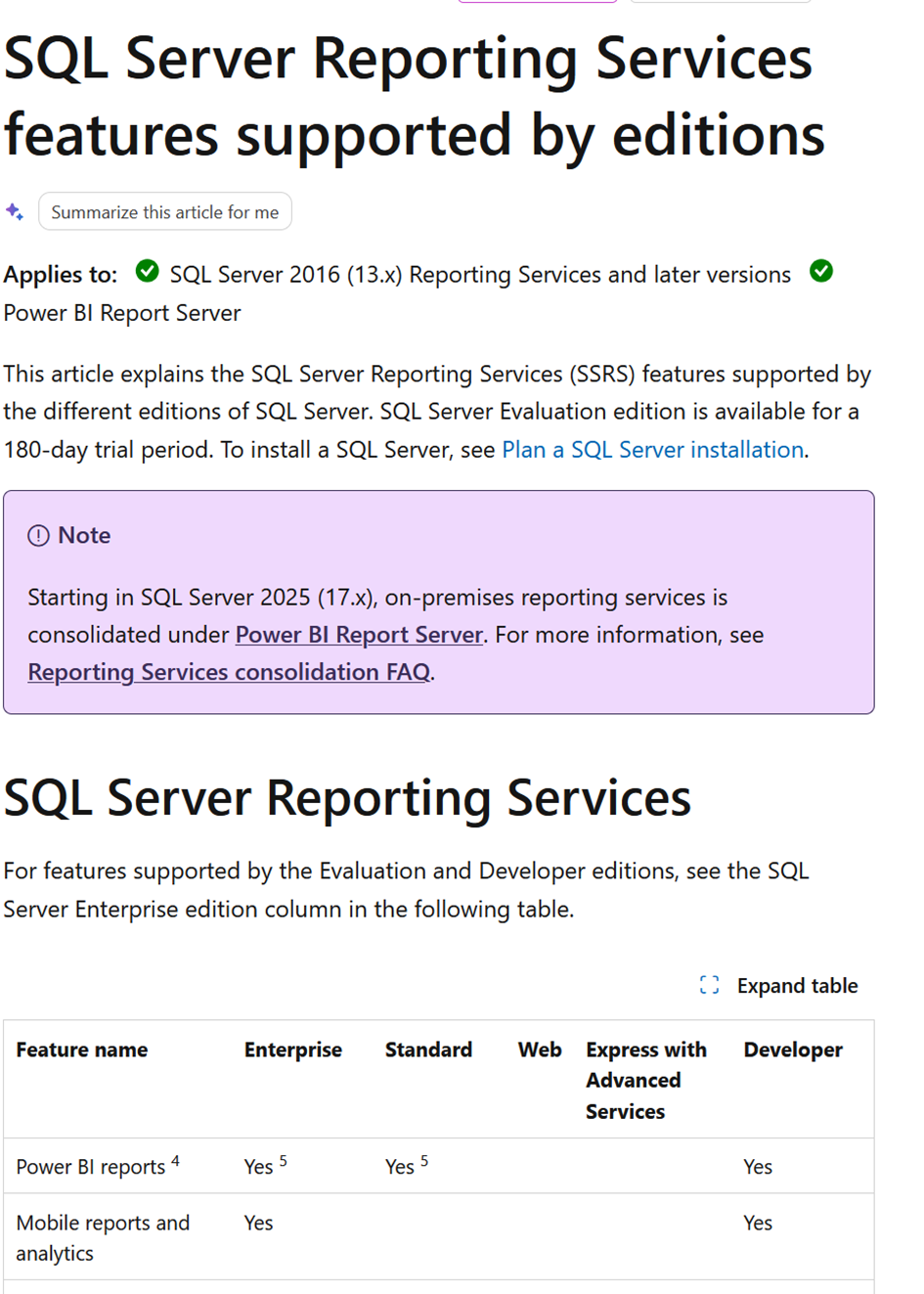
Microsoft did document the feature differences — but the information is tucked away in a place where you wouldn’t naturally look:
The page:
- lives under SSRS, not PBIRS
- is titled “SQL Server Reporting Services”
- tries to cover all supported SSRS editions going back to 2016
- includes features that are already deprecated
It’s not wrong — it’s just not intuitive.
A dedicated comparison page under “Power BI Report Server” would have made things much clearer.
PBIRS is the future, SSRS is no longer evolving, and a fresh, PBIRS‑focused feature matrix would help everyone.
The Good News
Let’s highlight something genuinely positive:
Power BI Reports are fully supported in both Standard and Enterprise Edition.
In my tests, I couldn’t find a single functional difference.
The only major limitation compared to the Power BI Service:
❌ No Subscriptions for Power BI Reports
Only paginated reports (classic SSRS) can be exported automatically via subscriptions.
Power BI Reports still don’t support scheduled exports on PBIRS.
Here’s what works perfectly fine in Standard Edition based on my tests:
- ✔️ Row‑Level Security in Power BI Reports with integrated data model
- ✔️ Power BI Reports with SSAS Live Connection
- ✔️ Paginated Reports
- ✔️ Email subscriptions for paginated reports
The Expected Limitations
Some features were Enterprise‑only in SSRS, and they remain Enterprise‑only in PBIRS.
❌ Mobile Reports and Analytics
This one is a bit fuzzy:
- SSRS Mobile Reports (RSMOBILE) were discontinued with SSRS 2022
- Power BI Mobile does support PBIRS
- The documentation doesn’t clearly define what “mobile reports” means in this context…I assume it relates to the SSRS feature..but that’s just an educated guess
- I don’t use mobile reports, so I can’t test it
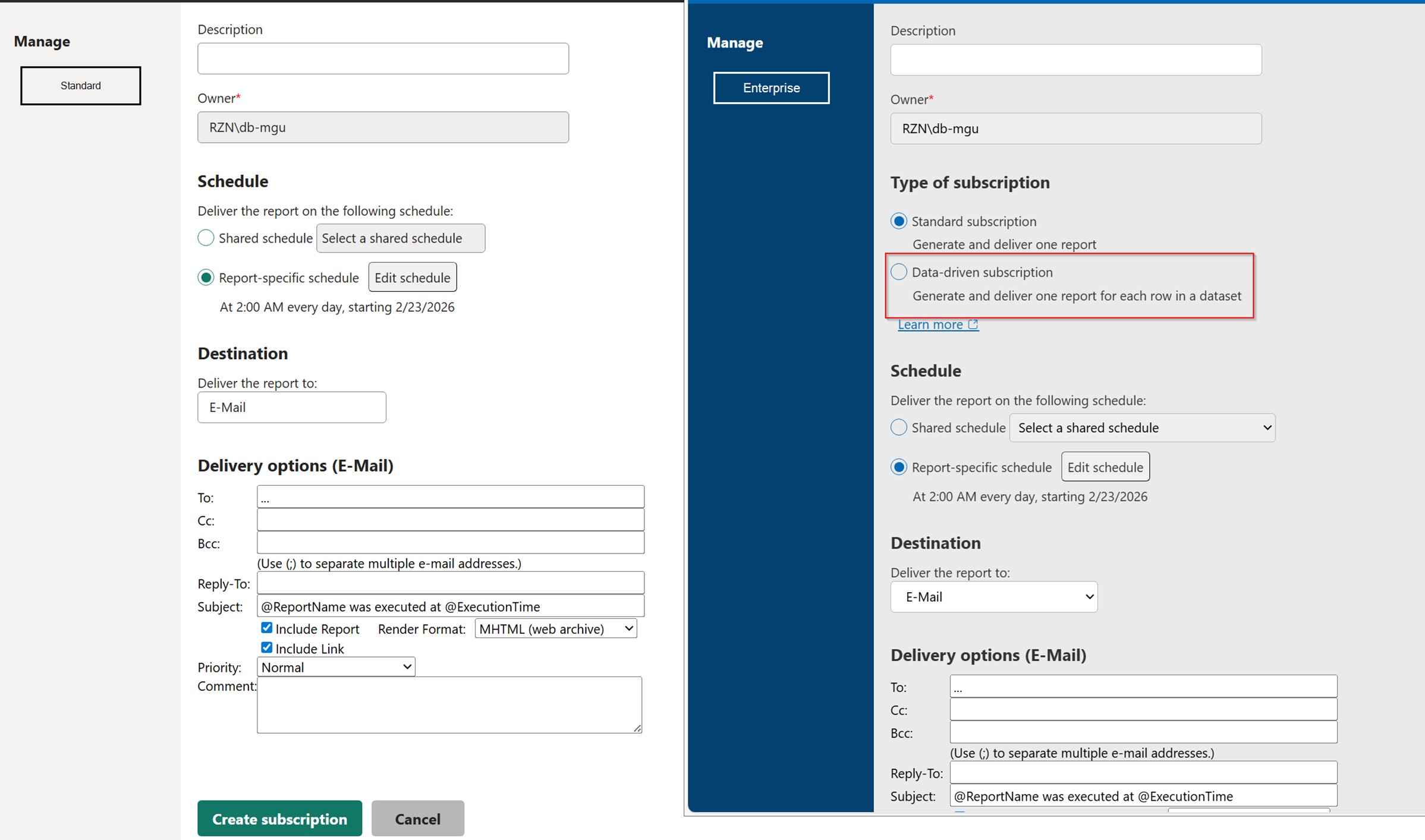
Enterprise‑only, and only for paginated reports.
Allows complex subscription logic.
Here’s a comparison screenshot of PBIRS Standard and Enterprise Edition.
You can clearly see that the choice “Type of subscription” does not exist in Standard Edition.
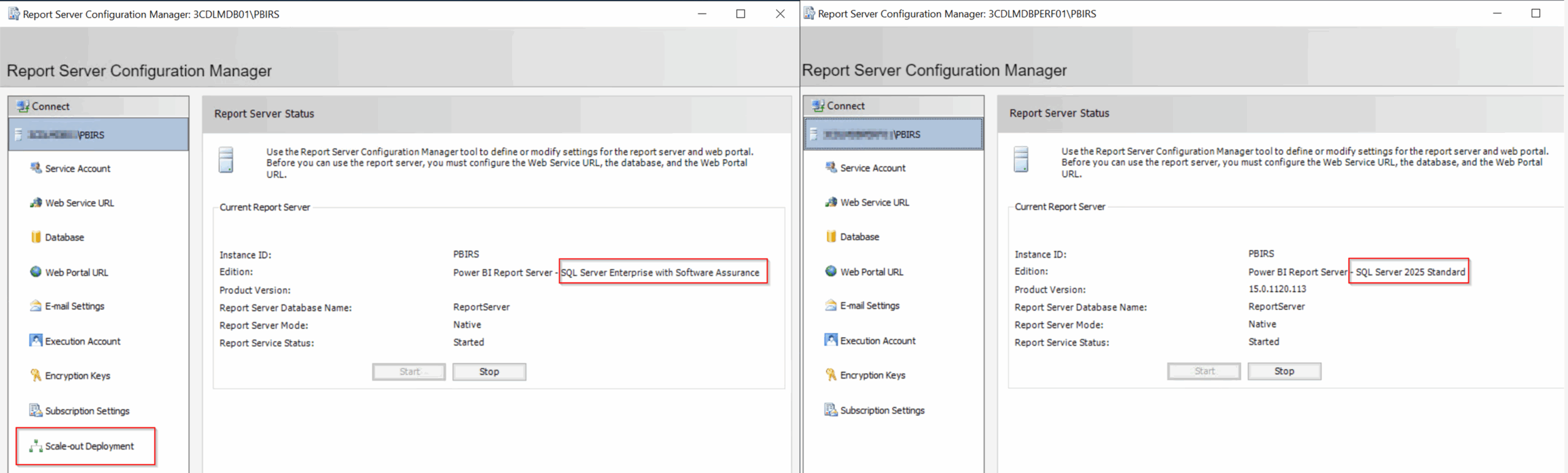
❌ Scale‑Out Deployment (Web Farms)
Load balancing and high availability.
Makes sense as an Enterprise feature.
In Standard Edition, virtualization is your friend if you need something similar.
Here’s a comparison screenshot between PBIRS Standard and Enterprise Edition for the Report Server Manager. PBIRS Standard has no menu entry for Scale Out.
❌ Legacy Features (not relevant anymore)
Only supported up to SSRS 2016:
- Alerting
- Power View
The One That Really Surprised Me: No Custom Branding
Why is Custom Branding — adjusting the portal colors to match your corporate identity — Enterprise‑only?
It feels like a feature that would benefit everyone.
So yes: I’ll write a follow‑up post showing how to get custom branding in Standard Edition anyway.
There are ways.
Lessons learned from testing
I initially tried restoring a production PBIRS database into a Standard Edition environment.
Reporting Services Configuration Manager threw me a warning:
The database was created by a higher edition of Report Server product, some features may become unsupported in runtime.
Followed by:
This edition of Reporting Services doesn’t support scale out, but the database has other servers registered. We’ll need to remove those to continue.
Clear message:
Some features simply won’t work.
Later I also ran into decryption errors — so I abandoned the experiment.
PBIRS must connect to a licensed SQL Server Standard or Enterprise instance.
You cannot use a Developer Edition database for PBIRS with a product key.
Final Thoughts
PBIRS is powerful, stable, and for many on‑premises scenarios absolutely the right tool.
And it’s genuinely encouraging to see Microsoft accelerating the Preview → GA pipeline again.
Once features hit GA, they usually land in PBIRS quickly — a very positive trend.
Yes, documentation could be clearer.
Yes, communication could be smoother.
But the product itself is solid, and Power BI Reports run beautifully on Standard Edition.
More soon — especially on how to sneak custom branding into Standard Edition.
Disclaimer
This article was created based on my personal notes with support from Microsoft Copilot. While Copilot assisted in structuring and refining the content, all technical details have been carefully reviewed and developed by me.