Making Paginated Reports Less Annoying: Excel Subscriptions and Semicolon CSV
Every now and then I run into one of those long‑standing defaults in Power BI Report Server that feel like they’ve survived unchanged since the early SSRS days.
A perfect example: email subscriptions for paginated reports still default to MHTML. Not exactly the format anyone is excited to receive in 2026.
And yes — everything described in this post applies only to paginated reports, the report type formerly known from SQL Server Reporting Services (SSRS). Power BI reports (.pbix) are not affected by these settings because there is no such thing as a subscription in ReportServer for these reports to start with.
In my case, subscriptions should deliver Excel (XLSX) files by default. And since I was already editing rsreportserver.config, I also added a much more practical export option for many European users: a semicolon‑delimited CSV.
Here’s how to configure both.
Set Excel as the Default Export Format for Email Subscriptions
The configuration lives in:C:\Program Files\Microsoft Power BI Report Server\PBIRS\ReportServer\rsreportserver.config
Note: It is prudent to make a backup copy of the file before editing. If you screw up something you can roll back to your former config easily by just renaming the copy.
Inside the node DeliveryUI, the email delivery extension contains a setting called DefaultRenderingExtension.
Set it to EXCELOPENXML and subscriptions will start sending Excel files instead of MHTML.
	<DeliveryUI>
		<Extension Name="Report Server Email" Type="Microsoft.ReportingServices.EmailDeliveryProvider.EmailDeliveryProviderControl,ReportingServicesEmailDeliveryProvider">
			<DefaultDeliveryExtension>True</DefaultDeliveryExtension>
			<Configuration>
				<RSEmailDPConfiguration>
					<DefaultRenderingExtension>EXCELOPENXML</DefaultRenderingExtension>
				</RSEmailDPConfiguration>
			</Configuration>
		</Extension>
		<Extension Name="Report Server FileShare" Type="Microsoft.ReportingServices.FileShareDeliveryProvider.FileShareUIControl,ReportingServicesFileShareDeliveryProvider"/>
		<Extension Name="Report Server PowerBI" Type="Microsoft.ReportingServices.PowerBIDeliveryProvider.PowerBIDeliveryUIControl,ReportingServicesPowerBIDeliveryProvider"/>
	</DeliveryUI>
Save the file, restart the Power BI Report Server service — done.
Add a Semicolon‑Delimited CSV Export Option
The built‑in CSV renderer uses commas, which is fine in the US but not ideal in regions where Excel expects semicolons.
To fix this, you can add a custom CSV renderer.
This approach is based on the solution described on Tips and Tricks NL.
Edit the same rsreportserver.config file, this time in the section <Render> , and add:
<Extension Name="CSVsemicolon" Type="Microsoft.ReportingServices.Rendering.DataRenderer.CsvReport,Microsoft.ReportingServices.DataRendering">
	<OverrideNames>
		<Name Language="en-US">CSV (semicolon delimited)</Name>
		<Name Language="de-DE">CSV (Trennzeichen Semiokolon)</Name>
	</OverrideNames>
	<Configuration>
		<DeviceInfo>
			<FieldDelimiter>;</FieldDelimiter>
			<Qualifier>"</Qualifier>
		</DeviceInfo>
	</Configuration>
</Extension>
What FieldDelimiter and Qualifier actually do
- FieldDelimiter
Defines the character used to separate fields.
Setting it to ; makes the output compatible with Excel in many European locales. - Qualifier
Defines the character used to wrap fields only when necessary.
The default is already the double quote (“), and that’s exactly what you want.
· The qualifier is applied only when escaping is required — for example, when a field contains:
- the delimiter
- or the qualifier character itself
· In all other cases, fields are written without quotes.
You can find the official documentation of all settings here: https://learn.microsoft.com/en-us/sql/reporting-services/csv-device-information-settings?view=sql-server-ver17
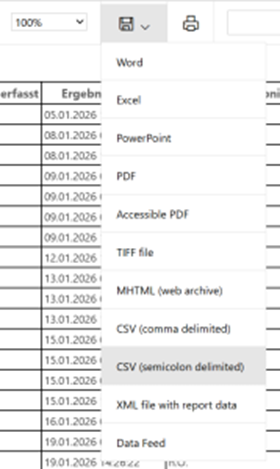
Save the file, restart the service — and you’ll see a new export option:

Wrap‑Up
Two small tweaks in rsreportserver.config, two very practical improvements — and again, these apply only to paginated (SSRS‑style) reports:
- Subscriptions now send Excel instead of MHTML
- CSV exports become semicolon‑friendly, matching what most users expect in Central Europe
If you work with paginated reports regularly, these adjustments are absolutely worth the few minutes they take.
For more information feel free to take a look at the official documentation from Microsoft.
Disclaimer
This article was created based on my personal notes with support from Microsoft Copilot. While Copilot assisted in structuring and refining the content, all technical details have been carefully reviewed and developed by me.